Waterfall Chart
Overview
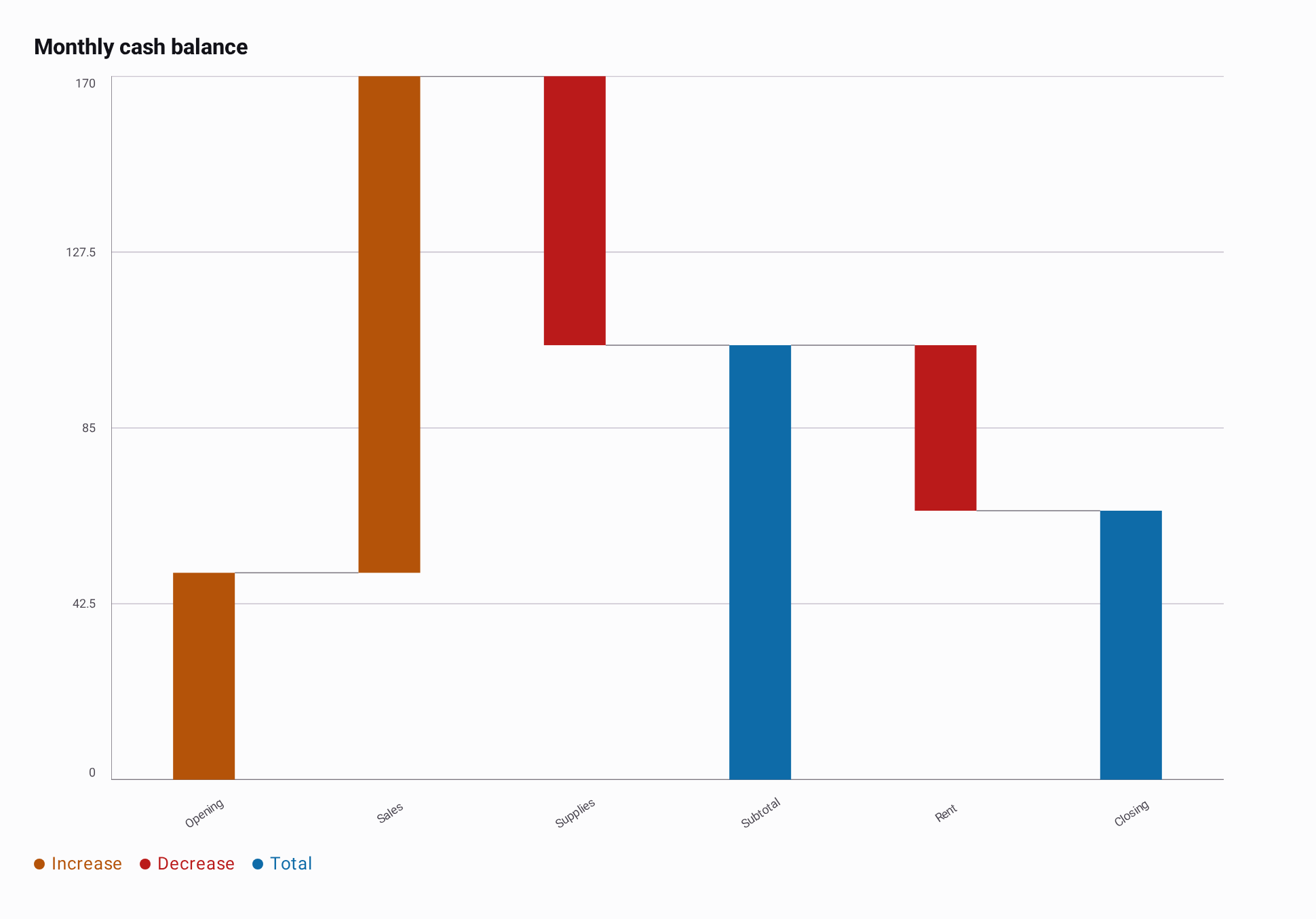
A waterfall chart shows how gains and losses contribute to a running balance. Use it for cash flow, revenue to profit, or changes in a budget. Positive changes rise from the previous balance; negative changes fall from it. Total bars show the current balance from zero, and connectors join each step at its ending balance.
The chart fits every bar in its available width. It reduces category labels to avoid crowding and supports selection and entry animation. Bars use solid colors. Scrolling and zooming are outside the initial scope.
Basic Usage
import androidx.compose.runtime.Composable
import androidx.compose.ui.Modifier
import io.github.hdcharts.waterfall.WaterfallChart
import io.github.hdcharts.waterfall.WaterfallData
import io.github.hdcharts.waterfall.WaterfallEntry.Change
import io.github.hdcharts.waterfall.WaterfallEntry.Total

val monthlyCashBalance =
    WaterfallData(
        listOf(
            Change("Opening", 50.0),
            Change("Sales", 120.0),
            Change("Supplies", -65.0),
            Total("Subtotal"),
            Change("Rent", -40.0),
            Total("Closing"),
        ),
    )

@Composable
fun ShowMonthlyCashBalance(modifier: Modifier = Modifier) {
    WaterfallChart(data = monthlyCashBalance, modifier = modifier, title = "Monthly cash balance")
}
Data Mapping
WaterfallData holds an immutable list of WaterfallEntry.Change and WaterfallEntry.Total entries.
Map domain objects with items.map { item -> Change(item.category, item.amount) }, then pass the list
to WaterfallData. Insert Total("Subtotal") wherever the running balance should be shown from zero.
The balance starts at zero. Use a Change entry for an opening balance. A Total carries only a
category: its value is the computed running balance, and it leaves that balance unchanged.
Consecutive totals therefore display the same value. This separate model makes changes and totals
explicit while keeping the shared ChartData model unchanged.
At least one entry is required. Changes and every intermediate balance must be finite; invalid
inputs display the shared chart error UI. Values use Double addition in entry order, including its
normal rounding limits. A zero change draws a thin bar at its current balance.
Capabilities
Selection
Use the shared rememberChartSelection() state. selection.selectedIndex refers to the original
entry order. The heading displays the category, change amount for change entries, and resulting
running balance. Read the entry from data.entries[index] and the balance from
data.runningTotalAt(index) in a selection callback.
interactionEnabled = false disables tap and drag selection while preserving programmatic selection.
Replacing the data clears the selection, as with other charts.
Styling
WaterfallChartDefaults.style() groups the shared container, axes, range, selection indicator and
legend with Waterfall bar colors and connectors. Set bars with WaterfallChartDefaults.bars() to
choose positiveColor, negativeColor, totalColor, maxBarWidth, and space. Bars shrink to fit
narrow containers. Use the axes' label visibility and maximum counts to control long category labels.
connectors uses the shared AxisLinesStyle: change its visible, color, and lineWidth values.
The horizontal axis follows zero, and automatic Y bounds include every intermediate balance.
range uses the shared BarRangeStyle for optional fixed bounds.
Value Formatting
Supply valueFormatter for the selected change and balance, and axisValueFormatter for Y labels.
For example, { value -> "$${value.toInt()}k" } formats data recorded in thousands of dollars.
Setup
Add this chart to your project
Choose the target and dependency scope to generate a Gradle Kotlin DSL snippet.
A commonMain dependency is shared with every consuming target. Use this only if HDCharts publishes compatible variants for all those targets; otherwise choose a supported platform source set.
kotlin {
    sourceSets {
        commonMain.dependencies {
            implementation("io.github.hdcharts:waterfall:3.2.0-SNAPSHOT")
        }
    }
}
Uses the waterfall artifact, without pulling in every chart module.
Required for snapshot builds: Maven repository
Merge this repository into the existing repositories in settings.gradle.kts. Do not replace your other repositories.
dependencyResolutionManagement {
    repositories {
        mavenCentral()
        maven("https://central.sonatype.com/repository/maven-snapshots/")
    }
}